Managing dependencies
Links express dependencies between Config Units. They indicate that configuration data should be propagated from the upstream (target) unit to the downstream (source) unit -- the Link direction is the opposite of the direction that data flows. Downstream units link to upstream units that they depend upon.
Link types
The UpdateType field on a Link determines what kind of data propagation is performed:
| UpdateType | Purpose |
|---|---|
UpgradeUnit |
Merge upstream data and track upstream revision (for variants) |
MergeUnits |
Merge upstream data without revision tracking |
Insert |
Insert upstream data at a specific path, as a string value or inlined as configuration data (optionally via a transform function) |
Upsert |
Render upstream resources (optionally via a transform function) into the downstream unit, replacing matching resources |
TransformPaths |
Read named values from upstream paths and getter functions, and write Go template or CEL expression results to downstream paths and setter function arguments |
NeedsProvides |
Match needed values to provided values (default) |
Apply ordering
Links affect configuration data, not deployment order. A Release bundles the units of a space and a GitOps operator applies the bundle, so apply ordering is the operator's concern — express it in the cluster with Argo CD sync waves or Flux dependsOn.
Automatic vs manual resolution
Resolution of a Link can be automatic or manual:
- Automatic: Set
AutoUpdateto true on the Link. The downstream unit is updated asynchronously whenever the upstream unit changes. - Manual: Leave
AutoUpdatefalse (the default). Trigger resolution explicitly with the--resolveflag onunit update.
To resolve all non-auto-update Links on a unit:
cub unit update --space prod --patch --resolve "Link:*" backend
To resolve a specific Link by name:
cub unit update --space prod --patch --resolve "Link:prod/my-link-slug" backend
To preview what a resolve will do without committing the change, add --dry-run:
cub unit update --space prod --patch --resolve "Link:*" --dry-run backend
A resolve reads the upstream unit at its head. --merge-end names an earlier revision of it instead, for every Link type except NeedsProvides:
cub unit update --space prod --patch --resolve "Link:*" --merge-end 12 backend
A manual Link is also how a change to an upstream unit is rolled out stage by stage: a ChangeOrder of the Link's type names the change, and promoting it resolves each Space's Links at the revision it names. See rollouts from a source outside the component.
UpgradeUnit links
UpgradeUnit Links are used with variants (clones). When you clone a unit, ConfigHub automatically creates an UpgradeUnit Link from the clone (downstream) to the original (upstream). A unit can have at most one outgoing UpgradeUnit Link.
The Link records which upstream revision was last merged. What an upgrade must not overwrite is decided by the protection stored per path on the clone, which is what preserves local customizations.
Upgrade can be triggered in two ways:
# Using the --upgrade flag (applies the link's WhereMutation filter, if it has one)
cub unit update --space prod --patch --upgrade backend-clone

# Using --resolve on the UpgradeUnit link
cub unit update --space prod --patch --resolve "Link:*" backend-clone
Both approaches produce the same result. For bulk upgrades across spaces:
cub unit update --patch --upgrade --where "UpstreamUnit.Slug = 'backend' AND Space.Labels.Environment = 'prod'"
A unit's UpstreamUnitID is read-only. To establish, change, or remove the upstream relationship after a unit has been created, create, modify, or delete the unit's UpgradeUnit Link instead. See creating and managing variants for more details.
MergeUnits links
MergeUnits Links merge all upstream configuration data into the downstream unit, with downstream changes treated as overrides. This is similar to UpgradeUnit but without updating the unit's UpstreamUnitID and UpstreamRevisionNum. More flexible: a unit can have any number of incoming and outgoing MergeUnits Links.
Splitting and combining units
With WhereResource, MergeUnits can be used to split one unit into multiple units. For example, separating CustomResourceDefinitions from other resources:
cub link create --space my-space - my-crds source-unit --update-type MergeUnits --where-resource "ResourceType LIKE '%CustomResourceDefinition'"
cub link create --space my-space - my-resources source-unit --update-type MergeUnits --where-resource "ResourceType !~~ '%CustomResourceDefinition'"
It can also combine resources from multiple upstream units into one downstream unit using multiple Links.
WhereMutation filter
For both MergeUnits and UpgradeUnit Links, WhereMutation selects downstream mutations whose paths the merge must not overwrite. It is empty by default and is unioned with the stored per-path protection, so it protects more and never less. See protecting downstream paths by rule.
Insert links
Insert Links take the configuration data of the upstream unit and write it to a specific path in the downstream unit. This lets you manage a fragment of configuration — a sidecar container, a set of Helm values, an IAM policy — as its own versioned unit, and inject it where it is used.
The Binding's DataType selects how the data is written:
- As a string (
string, the default whenDataTypeis omitted) — the upstream unit's data is embedded verbatim as text. Use this for a field that holds an embedded document, such as an IAM policy. - As configuration data (the downstream unit's own format:
YAMLfor aKubernetes/YAMLunit,JSONfor anAppConfig/JSONunit, and so on) — the upstream unit becomes a sub-tree of the downstream unit's data, which can then be queried and mutated like the rest of it.
Inserting as a string
Store a JSON IAM policy in an AppConfig/JSON unit and insert it into the spec.policy field of a Kubernetes custom resource, which expects a JSON document as a string:
# Create the Kubernetes unit with a placeholder
cub unit create --space my-space ecr-repository ecr-repository.yaml

# Create the JSON policy unit
cub unit create --space my-space ecr-policy ecr-policy.json --toolchain AppConfig/JSON

# Create an Insert link with a binding identifying the target path
cub link create --space my-space - ecr-repository ecr-policy --update-type Insert \
    --manual-binding 'ecr.services.k8s.aws/v1alpha1/Repository:customer-hosted-ns/customer-hosted-app:spec.policy'

# Resolve the link to perform the insertion
cub unit update --space my-space --patch --resolve "Link:*" ecr-repository
Inserting as configuration data
--manual-binding names the place in the downstream unit as <resource-type>:<resource-name>:<path>. Following it with = and a DataType naming the downstream unit's format inlines the upstream unit instead. To inject a sidecar container held in its own AppConfig/YAML unit into a Deployment:
cub unit create --space my-space web web-deployment.yaml
cub unit create --space my-space otel-sidecar otel-sidecar.yaml --toolchain AppConfig/YAML

cub link create --space my-space - web otel-sidecar --update-type Insert --auto-update \
    --manual-binding 'apps/v1/Deployment:default/web:spec.template.spec.containers.?name=otel-agent=YAML'
The Deployment now carries the sidecar as ordinary configuration data:
      containers:
      - name: app
        image: nginx:1.27
      - name: otel-agent
        image: otel/opentelemetry-collector:0.100.0
        args:
        - --config=/etc/otel/config.yaml
The path ends in an associative selector (?name=otel-agent), which finds the list element with that key or appends it if it isn't there. Resolving the Link again replaces that element rather than appending a second one. A path without a selector replaces whatever is at the path.
Inlining Helm values into an ArgoCD Application works the same way, with NeededPath: spec.source.helm.valuesObject. The values are then real fields of the Application unit, so functions and filters can read and change them.
Formats only need to be compatible
The upstream and downstream units do not have to use the same format. Before insertion, the upstream unit is converted to the form ConfigHub operates on internally, so an AppConfig/TOML, AppConfig/INI, AppConfig/JSON, or AppConfig/Properties unit can be inserted into a YAML one. Constructs the native format carries outside its data model — comments, in particular — become fields during the conversion, and the downstream unit's format turns them back into native comments when its data is serialized.
If the upstream unit holds more than one document, it is inserted as a sequence, so a unit of container specs can be inserted at a path that holds a list.
Transforming the upstream unit first
--transform-invocation names an Invocation whose function runs on the upstream unit's data before it is inserted, which is how you insert part of an upstream unit or reshape it on the way in. Here get-yq selects one subtree out of a larger configuration unit:
cub invocation create --space my-space select-sidecar AppConfig/YAML -- get-yq --yq-expression=.sidecar

cub link create --space my-space - web app-config --update-type Insert --auto-update \
    --transform-invocation select-sidecar \
    --manual-binding 'apps/v1/Deployment:default/web:spec.template.spec.containers.?name=otel-agent=YAML'
The Invocation's ToolchainType must match the upstream unit, and its function must be non-mutating and produce YAML output.
Requirements
Insert Links require exactly one Binding, in ManualBindings, that specifies NeededResource.ResourceName, NeededResource.ResourceType, and NeededPath to identify the insertion point in the downstream unit. DataType is optional and must be either string or the downstream unit's own format. The ProvidedResource and ProvidedPath fields must not be specified in the Binding. Insert Links support both AutoUpdate true on the Link (for automatic propagation when the upstream unit changes) and false (for manual resolution). WhereResource can filter the upstream data before insertion.
Upsert links
Upsert Links pull one or more resources produced by the upstream unit — optionally first transformed by a TransformInvocation function — and insert or replace each of them in the downstream unit. The downstream unit must be Kubernetes/YAML, and ManualBindings must be empty.
The main use is rendering configuration authored in one toolchain into resources of another. For example, an AppConfig/* file can be rendered into a Kubernetes ConfigMap via a render-configmap transform function, with no server worker or renderer Target required. See application configuration for a complete walkthrough, including immutable vs. mutable ConfigMaps and pruning old revisions.
Unlike Insert, which writes the upstream document to one path within an existing resource, Upsert produces whole resources in the downstream unit. Like the other data-propagating links, Upsert supports automatic resolution via AutoUpdate.
TransformPaths links
TransformPaths Links read one or more named values from specified paths in the upstream unit and write the result of a Go template or CEL expression to specified paths in the downstream unit. Use them when the downstream value isn't a straight copy — when you want to derive it from one or more upstream values, combine it with Space or Unit metadata, or apply a small transformation.
Unlike NeedsProvides, the upstream and downstream paths are independent — there's no symmetric Binding. Unlike Insert, the value written can be a function of multiple upstream values rather than the entire upstream document.
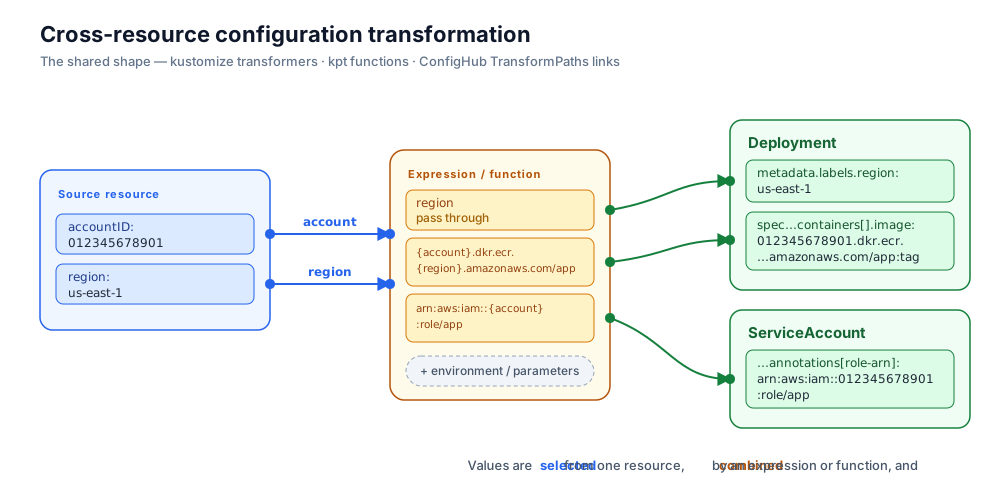
This is the same shape as a kustomize transformer or a kpt function: select values from fields of one resource, combine them in an expression or function, and write the results into fields of others.
For example, in an AWS environment the account ID and Region are authoritative in one place — a small AWSProfile custom resource the platform team maintains per environment — and many resources need values constructed from them. A workload's container image lives in that account's ECR registry (<account>.dkr.ecr.<region>.amazonaws.com/<repo>) and its ServiceAccount is bound to an IRSA role (arn:aws:iam::<account>:role/<name>). Both are deterministic functions of the account ID and Region, so they can be derived from desired state — no live status required.
AWSProfile is never applied to a cluster — it's marked config.kubernetes.io/local-config — but modeling the inputs as a custom resource lets a schema and semantics be associated with them, instead of treating them as opaque ConfigMap strings:
# aws-profile.yaml, in a shared "platform" Space
apiVersion: cloud.example.com/v1
kind: AWSProfile
metadata:
  name: prod
  annotations:
    config.kubernetes.io/local-config: "true"
spec:
  accountID: "012345678901"
  region: us-east-1
The downstream orders unit, in a per-environment Space, contains the Deployment and its ServiceAccount. The link reads the account ID and Region and writes three derived values: a Region label and the IRSA role-ARN annotation (per-path writes), and the ECR repository URI (a setter function, which preserves the existing tag):
cub link create --space orders-prod - orders aws-profile platform --update-type TransformPaths --auto-update \
    --upstream-path 'accountID=cloud.example.com/v1/AWSProfile:/prod:spec.accountID' \
    --upstream-path 'region=cloud.example.com/v1/AWSProfile:/prod:spec.region' \
    --downstream-path 'apps/v1/Deployment:default/orders:metadata.labels.aws-region={{.Params.region}}' \
    --downstream-path 'v1/ServiceAccount:default/orders:metadata.annotations.eks~1amazonaws~1com/role-arn=arn:aws:iam::{{.Params.accountID}}:role/orders' \
    --downstream-setter 'set-container-repository-uri orders template:{{.Params.accountID}}.dkr.ecr.{{.Params.region}}.amazonaws.com/orders'
Each flag states one entry of one of the Link's lists:
--upstream-path <name>=<resource-type>:<resource-name>:<path>reads a value from the upstream unit and names it.--downstream-path <resource-type>:<resource-name>:<path>=<expression>writes the expression's result to a path in the downstream unit. The expression is a Go template unless it begins withcel:, and its result is a string unless it begins withint:orbool:, as in=int:cel:params.replicas * 2. A dot inside a key of the path is written~1.--upstream-getter <name>=<function> [<argument>...]and--downstream-setter <function> [<argument>...]run a function, written as on thecub function docommand line. An argument that begins withtemplate:orcel:is evaluated first.
A <resource-name> includes the namespace, as in default/orders. The Link keeps the name it was given, and finds the resource by that name or, once the namespace has changed — after a clone and set-namespace, or when a variant fills in a confighubplaceholder namespace — by the name without its namespace, as long as only one resource of that type has it. A name that matches no resource, or matches resources of that type in several namespaces, makes the resolve fail with an error rather than write nothing. The same holds for the resources a --manual-binding names.
The upstream values an expression or a setter's arguments refer to are recorded as its Parameters. An entry that needs a field these flags don't carry, such as a setter's own WhereResource, is set with --set, or the Link is written in a file and passed with --filename.
The CEL equivalent of the repository-URI expression (cel: in place of template:) reads params.accountID + ".dkr.ecr." + params.region + ".amazonaws.com/orders". When the platform team re-maps the environment to a different AWS account or Region, they change aws-profile once and every linked workload's image registry, role ARN, and Region label re-derive.
Expression scope
The expression has two top-level scopes:
- The downstream Unit's FunctionContext — for Go templates as top-level fields (
{{.UnitSlug}},{{.SpaceSlug}},{{.UnitLabels.Environment}}, …), for CEL under thefunctionContextvariable (functionContext.UnitSlug, …). Same field names the function handler uses. - The named upstream values — for Go templates under
.Params.<name>, for CEL underparams.<name>. Names come from bothUpstreamPathsandUpstreamGetters(see below).
Parameters and identifier rules
Each PathExpression lists the upstream values it uses in Parameters. Every entry must match a Name from UpstreamPaths or UpstreamGetters on the same Link. The Name itself must be a legal Go and CEL identifier (starts with a letter or underscore, then letters/digits/underscores) so it can appear unquoted in expressions.
DownstreamPaths data types
DataType selects the type written by set-attributes. Supported values are string, int, and bool. The expression always renders to a string; ConfigHub then coerces the result (strconv.Atoi for int, strconv.ParseBool for bool). A coercion failure aborts the resolve.
UpstreamGetters — derive values from a ConfigHub function
When the upstream value is not directly addressable by a single path — it has to be computed from the upstream resources — declare an UpstreamGetters entry. Each entry runs a non-mutating ConfigHub function whose OutputType is AttributeValueList; the Value of the first returned AttributeValue is bound to Name and joins UpstreamPaths in the expression scope.
FunctionInvocation.WhereResource is an additional per-invocation resource filter that is AND-combined with Link.WhereResource. Use it when different getters need to look at different upstream resources within the same multi-resource Unit.
For example, rather than assembling the ECR registry host in the downstream expression, you can compute it once on the upstream side from two AWSProfile fields — a value that isn't addressable by any single path:
UpstreamGetters:
  - Name: registryHost
    FunctionInvocation:
      FunctionName: get-cel
      Arguments:
        - Value: 'r.kind == "AWSProfile" ? [{"ResourceName": r.metadata.?namespace.orValue("") + "/" + r.metadata.name, "ResourceType": r.apiVersion + "/" + r.kind, "Path": "spec.accountID", "Value": r.spec.accountID + ".dkr.ecr." + r.spec.region + ".amazonaws.com"}] : []'
All getters (and UpstreamPaths, via get-paths) run in a single function invocation on the upstream Unit. Worker functions are not supported.
DownstreamSetters — invoke mutating functions on the downstream Unit
DownstreamPaths only writes per-path values. When you need to invoke a mutating function — for example set-container-repository-uri to retarget a container's registry by name (rather than by a brittle list index), or set-yq/set-cel/set-starlark to write a value whose location is awkward to express as a literal path — declare a DownstreamSetters entry. Each setter is a FunctionInvocation that runs after argument expansion. FunctionInvocation.WhereResource is AND-combined with Link.WhereResource and lets each setter target a different subset of downstream resources.
DownstreamSetters:
  - Parameters: [accountID, region]
    FunctionInvocation:
      FunctionName: set-container-repository-uri
      WhereResource: "ConfigHub.ResourceType = 'apps/v1/Deployment'"
      Arguments:
        - Value: orders
        - Value: "{{.Params.accountID}}.dkr.ecr.{{.Params.region}}.amazonaws.com/orders"
          Evaluator: template
Argument Value is template-expanded client-side when the argument's Evaluator is set (template or cel) and the parameter's DataType is string. The scope is the same as for DownstreamPaths expressions, narrowed to the Parameters list on the setter. Non-string parameters and arguments without Evaluator are passed through unchanged. All setters run in a single function invocation on the downstream Unit. Worker functions are not supported.
Evaluation semantics
A TransformPaths resolve runs in two phases:
- Upstream phase — one invocation collects values for
UpstreamPaths(viaget-paths) andUpstreamGetterson the upstream Unit. - Downstream phase —
DownstreamSettersrun in one invocation, thenDownstreamPathsare written in oneset-attributesinvocation. Both summaries are merged.
If any UpstreamPath or UpstreamGetter returns no value (for example, the path doesn't exist after the WhereResource filter, or the getter returns an empty list), the resolve is aborted: nothing is written and the explicit (--resolve) caller gets an error. The auto-update path logs the failure and continues with subsequent Links.
When to choose TransformPaths
- Use NeedsProvides when the upstream attribute is part of the registered needs/provides catalog and you want auto-discovery to match it.
- Use Insert when you want the whole upstream document at one path, either as a string or inlined as configuration data.
- Use TransformPaths when the path is concrete on both sides and the value needs computation, or when you want to fold in Space/Unit metadata via expressions. An
UpstreamGetteralso lets you derive a value from the upstream document as a whole rather than from one path —get-hash, for instance, to carry a ConfigMap's content hash onto a workload's pod template so that changing the ConfigMap rolls the workload.
NeedsProvides links
NeedsProvides is the default Link type. It matches needed values in the downstream unit with provided values from the upstream unit, and propagates the provided values to the needed locations. See needs/provides for the conceptual background.
Placeholders (see also managing variants) indicate values that need to be supplied. They can be replaced by various means, but most commonly by creating Links to dependencies or by mutating triggers.
To create a NeedsProvides Link from a backend unit to a ns unit:
cub link create --space prod - backend ns
In this case, the name from a Namespace resource in the ns unit could be inserted into the namespace field of resources in the backend unit where the values are set to confighubplaceholder. ConfigHub discovers that Units containing Namespace resources provide namespace names and that resources like Deployment and Service need them. The identification and extraction of needed and provided values is performed by functions (get-needed and get-provided), and ConfigHub matches them and uses the set-attributes function to update the needed values.
Variants aren't required in order to use NeedsProvides Links, but in Kubernetes the main reason to use placeholder values is to leave them unbound until the configuration is linked to a providing unit.
NeededPaths and ProvidedPaths
NeededPaths and ProvidedPaths are stored on each Unit and updated automatically when the unit's data changes. These stored paths enable efficient matching when Links are resolved.
Bindings
After a NeedsProvides Link is resolved (either automatically or manually), the Link's Bindings record which values resolution matched and propagated. Resolution rebuilds them each time it runs, so Bindings is read-only. For example, a namespace binding:
{
  "AttributeName": "resource-name",
  "DataType": "string",
  "NeededPath": "metadata.namespace",
  "NeededResource": {
    "ResourceCategory": "Resource",
    "ResourceName": "confighubplaceholder/mydep",
    "ResourceType": "apps/v1/Deployment"
  },
  "ProvidedPath": "metadata.name",
  "ProvidedResource": {
    "ResourceCategory": "Resource",
    "ResourceName": "/test-ns",
    "ResourceType": "v1/Namespace"
  }
}
Once established, Bindings enable updated values from the upstream unit to continue propagating to the corresponding downstream unit on subsequent resolutions.
Manual bindings
Bindings can also be written by hand, in the Link's ManualBindings. This is useful for propagating values to or from non-standard locations or for resource types for which the built-in needs/provides identification hasn't been added yet. Resolution uses a manual binding as it is, and doesn't match its needed path again, so it never appears in Bindings. --manual-binding gives the place in the downstream unit that needs the value, then the place in the upstream unit that provides it, each as <resource-type>:<resource-name>:<path>:
cub link create --space my-space - subnet route-table --update-type NeedsProvides --auto-update \
    --manual-binding 'example.services.k8s.aws/v1alpha1/Subnet:/my-subnet:spec.routeTableRefs.0.from.name=example.services.k8s.aws/v1alpha1/RouteTable:/my-route-table:metadata.name'
Additionally, you can define Attributes in a Space to register additional paths for automated needs/provides binding with custom resource types.